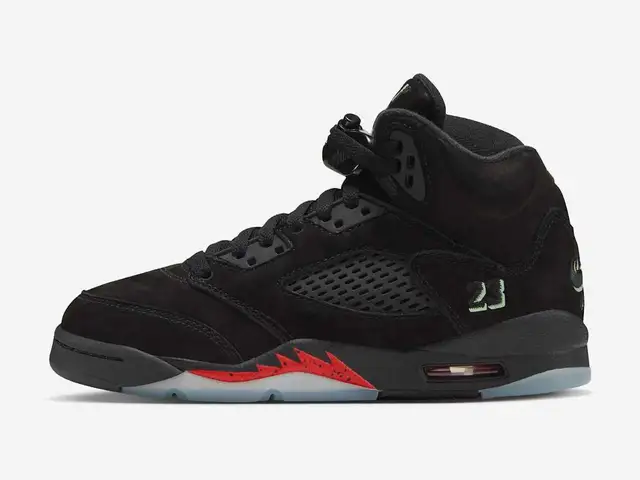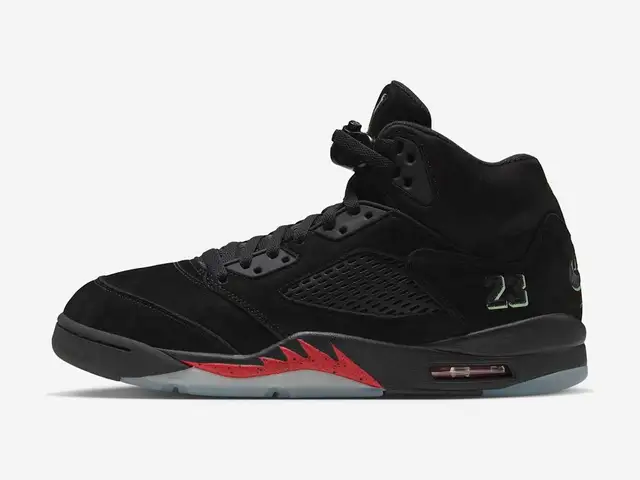
Search the full Nike style code to narrow down an exact shoe, then check the product page before choosing it. A nickname such as “Halloween 5s” can lead to adult, Big Kids and toddler pairs together. The code helps separate those listings. It is especially useful when a friend sends a cropped screenshot with the category missing, or two shops use different names for the same colorway.
Where does Nike show the style code?
Nike shows it in the product details, but the field name can differ between Nike.com and SNKRS. Look for Style or SKU, then copy the whole value.
For example, Nike’s Big Kids Halloween Jordan 5 page
prints HQ7980-001 beside Style. The
adult SNKRS launch page
uses SKU for HQ7978-001.
| Page you are reading | Field to find | Keep with the code |
|---|---|---|
| Nike.com product page | Style in the product details | Product category and selected colorway |
| SNKRS launch page | SKU in the release description | Release name and country |
| A shop or calendar | Style code or SKU, if supplied | Link to the exact listing |
Our SKU definition covers what the term means. For a lookup, the useful habit is simpler: copy the complete code rather than retyping the part you remember. Keep the hyphen and every character after it.
How do you search the code and check the result?
Search the code with “Nike”, then confirm it on the page you reach. A search result is a route to a listing, not the final check.
- Copy the full code from the source you have.
- Search it with the brand name, for example
Nike HQ7980-001. - If results are broad, try the exact code in quotation marks.
- Follow the official product result when one is available.
- Compare its code, category and colorway with the pair you wanted.
Keep the full product link once you find it. Next time you check the size or schedule, you can return to that listing without repeating the search.
Check the category before the size
The two Halloween examples show why a correct name is only part of the job. Both are Jordan 5s in the same family, but their codes point to separate adult and Big Kids products.
| Halloween Jordan 5 version | Published code | Next check |
|---|---|---|
| Adult | HQ7978-001 | Adult product details and Size Guide |
| Big Kids | HQ7980-001 | Big Kids product details and Size Guide |
These are identification examples, not a claim that either pair is available now. The family-release finder connects matching listings from our US calendar. The GS, PS and TD size guide explains which category labels to look for.
Nike’s sizing help directs you to the Size Guide on the product. Use that after identifying the shoe; a style code does not choose your size.
What if the code returns nothing or the wrong shoe?
Check what you copied before changing the product you are looking for. A missing character or a cropped screenshot gives the search less to work with.
| Problem | Useful next check |
|---|---|
| No relevant result | Compare the code character by character with the original |
| Several similar pairs | Look for the full code on each destination page |
| Adult and kids’ results mixed together | Read the category and code together |
| A different country’s listing | Verify the local schedule and size system separately |
| An old page with no stock | Keep it for identification; check current availability elsewhere |
If the original image is unclear, ask for the full listing link. Guessing one character can send you to a convincing page for another pair.
Nike also offers help finding a product through its Experts. Its guidance asks for the style, size and color you want. Send the information you have, including the source image if it explains the confusion, instead of filling in details you cannot read.
Does a code confirm authenticity or a release date?
No. The code helps identify the product; it cannot establish the origin of a physical pair or confirm today’s schedule by itself.
A correct reference on Nike’s site does not authenticate another seller’s photographs. Likewise, an old product page can identify the shoe without confirming a new release. Keep those questions separate from the lookup.
For conflicting dates, follow the release-date checks. Once you have the right upcoming pair, the SNKRS draw guide explains how entries work.
Which result should you keep?
Keep the listing whose full code, category and colorway match the pair you want. Save its link beside your chosen size and the relevant country.
Then use the drop day checklist to prepare the entry. The lookup has done its job when you can name the exact product, return to its page and explain which size you selected.
Questions people ask
Where can I find a Nike style code online?
Look in the product details on Nike.com for the Style field, or in the description on a SNKRS launch page for SKU. Copy the full value and check the category beside the product name.
How do I search for a Nike shoe by style code?
Search the complete code with Nike, then compare a result's product name, colorway and category. If results are unclear, try the code in quotation marks. Read the destination page instead of relying on its search snippet.
Can adult and kids' Nike shoes have different style codes?
Yes. The adult Halloween Jordan 5 uses HQ7978-001, while the Big Kids product uses HQ7980-001. A shared model name or colorway does not mean the listings offer the same product or sizes.
Does a matching Nike style code prove a shoe is authentic?
No. Finding the code on an official product page identifies what that listing describes. It does not establish the origin or condition of a physical pair offered by another seller. Treat identification and authentication as separate checks.
Sources
- Nike product details - Halloween Jordan 5 Big Kids Style field · Nike · Checked
- Nike SNKRS - Halloween Jordan 5 adult SKU and family listings · Nike · Checked
- Nike Help - finding a product through Nike Experts · Nike · Checked
- Nike Help - finding the product's Size Guide · Nike · Checked